Independent informational guide — Based on public details provided by Shein’s Free Trial Support Portal. We hold no partnership with Shein. Candidate selection is discretionary and receiving products is never guaranteed. Always review the official terms for each campaign.
If you’ve ever navigated to the trial section, tapped around, and still felt uncertain — you’re not the only one. The workflow becomes easy to navigate once you understand the necessary sequence.
Below is an overview of how users enter, track updates, and submit feedback. Selection is never guaranteed, but following the established guidelines helps prevent mistakes that disqualify applications early on.
1
Access the Free Trial Hub
Sign in to your Shein profile. Inside the mobile app, head to your account tab → More Services (or Other Services) → Free Trial Center. On a desktop browser, locate Free Trial within the community or service menus.
Explore the listed items currently open. Product selections rotate frequently, meaning current listings might change in upcoming days.
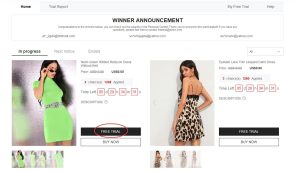
Demonstrational path to reach the testing hub (reference visual)
2
Submit up to 3 entries each week
Every account is allotted 3 submission slots per week. Unused entries do not roll over to the following period.
When you spot a item you wish to apply for:
- Tap Free Trial on the desired item
- Pick your appropriate sizing
- Confirm a delivery address matching the same region as the Shein domain you are browsing
- Press Submit
Note: If the destination country differs from the regional store site, the system may reject the request. Verify these details prior to submitting.
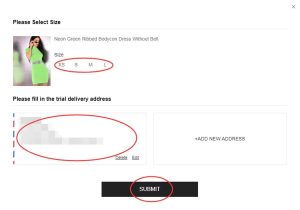
Size and address selection screen (reference guide visual)
3
Monitor progress in My Applications
Review periods typically take around one week. Visit My Free Trial / My Applications to check status updates:
- Approved — your profile was chosen. The system processes an order at $0 and dispatches it without extra delivery charges.
- Failed — that particular entry was not selected. You may reapply for alternate items as new rounds open.
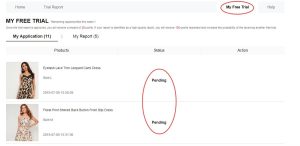
Dashboard view to track Approved or Failed application updates
4
If chosen, evaluate the item and submit feedback
If selected and the product arrives, test it out and evaluate aspects like build, fit, material quality, and overall comfort.
Then publish an authentic, thorough review via your account dashboard — ideally within 10 days of delivery. You can manage this under My Report.
Recommended practices for feedback submissions:
- Balanced observations covering both benefits and drawbacks
- Clear photographs — including a full-length photo plus close-ups of fabric details
- Specific feedback regarding sizing accuracy, texture, and everyday wear
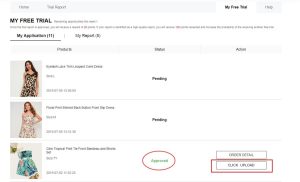
Feedback upload page (reference illustration)
Regarding reward points: A verified report can yield roughly 20 points. Submissions designated as “Quality Reports” may award about 100 additional points.
Should your initial evaluation be returned, you are generally granted one additional opportunity to revise and resubmit.
Key rules to keep in mind
• Maximum of 3 submissions weekly (chances reset every week)
• Delivery address must match the regional location of the Shein site used
• Standard shipping is handled by Shein; import duties depend on local regulations
• Try to upload your feedback report within 10 days following arrival
• Operating duplicate or false accounts can lead to permanent trial restriction
• Failing to submit a report may negatively impact future candidate eligibility
Frequent errors that hinder approval
❌ Incomplete profile details or selecting incorrect sizes
❌ Listing a shipping address outside the regional storefront’s country
❌ Applying late after available slots for trending items are already taken
❌ Submitting brief, vague reviews missing original photos
❌ Missing the designated review submission window
❌ Registering multiple user accounts to bypass weekly entry limits
Frequently Asked Questions
Are there delivery fees?
Under standard trial conditions, Shein covers standard transit fees. Depending on destination laws, local customs fees may still apply.
How many items can I request per week?
Up to 3 weekly slots. Unused entries expire at the end of the weekly cycle.
If selected, do I get to keep the product?
Yes. Selected applicants keep the evaluated item upon successfully submitting the requested review report.
How long before application results are released?
Typically around one week. You can track status changes under My Free Trial or My Applications.
What happens if my report is rejected?
You usually receive a second chance to update the feedback and submit it again according to the platform guidelines.
Is a large social media following required?
No. Selection systems emphasize genuine, detailed reviews and steady profile engagement over follower metrics.
To recap the entire flow: access the testing hub → submit entries (limit 3/week) → await selection results → if selected, receive the item → submit a detailed evaluation with clear photos. Keep your profile information current, submit early as new listings appear, and fulfill the review step on time.
Ready to check available testing opportunities?
Explore current trial options and submit your entries using the guidelines above. Selection is discretionary and never guaranteed.
VISIT FREE TRIAL CENTER NOW
You will be redirected to Shein’s official Free Trial Center portal.
Source reference: Shein Free Trial Help Center